Registrations and fee
You must register in Studentweb every semester. Registration deadline is 1 September for the autumn semester and 1 February for the spring semester.
-
Semester fee
Semester fee
Important!
Payment for international students from an international bank: It's mandatory to send a screenshot of the payment to sc@nhh.no for manual registration.Full-time students have to pay a semester fee every semester. You will find an invoice on Studentweb. The semester fee is currently NOK 935 whereof NOK 650 goes to the Student Welfare Organization in Bergen (Sammen), and NOK 50 is a voluntary fee to NHH Aid. If you don't want to support NHH Aid, the amount is NOK 885,-
The remaining NOK 235 per semester, goes in full to Kopinor. The Kopinor agreement allows employees and students at NHH to copy from books and other copyrighted material. The copy fee will be given as consideration to the authors and licensees of the work. All universities and colleges have a separate agreement with Kopinor and pay a yearly fee per student (full-time equivalent) and per employee.
For more information about the semester fee, please visit the Website of Sammen
Refund of the semester fee
You may apply for a refund of the semester fee if you have:
- paid too much
- paid the semester fee to another student organization in addition to Sammen
- paid the semester fee but will not be studying at NHH this semester
The application deadline is 1 February for the spring semester and 1 September for the autumn semester. Please use this form.
-
Semester and Course registration
Semester and Course registration
As a student you must complete the registration in Studentweb every semester to confirm your student status and to register for courses and exams. This is also where you confirm tour education plan, which is a progess plan for your studies.
Deadline for registration:
- 1 February for the spring semester
- 1 September for the autumn semester
Guide to the registration
1. When you log in to Studentweb, click the green button called “Start registration.”
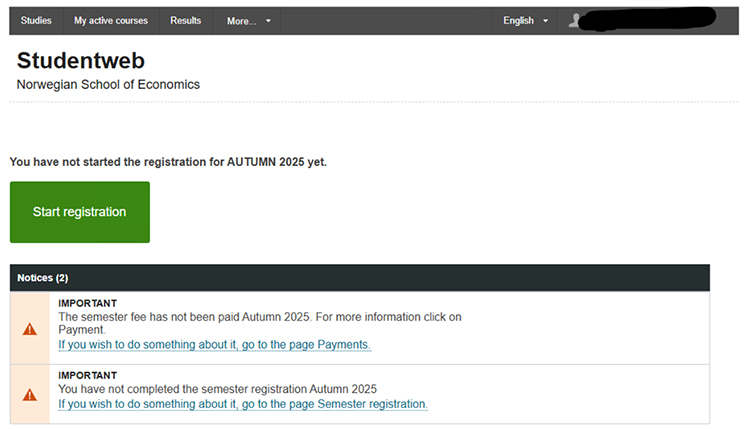
2. Registration and obligations: You must confirm that you have read and understood the rules and regulations for students at NHH.
3. Education plan: Here you can see an overview of the courses included in your study programme at NHH. This is also where you register for courses.
If you want to take more than 30 ECTS credits in one semester, you can search for the course code and register for additional courses under “My active courses” in the top menu in Studentweb.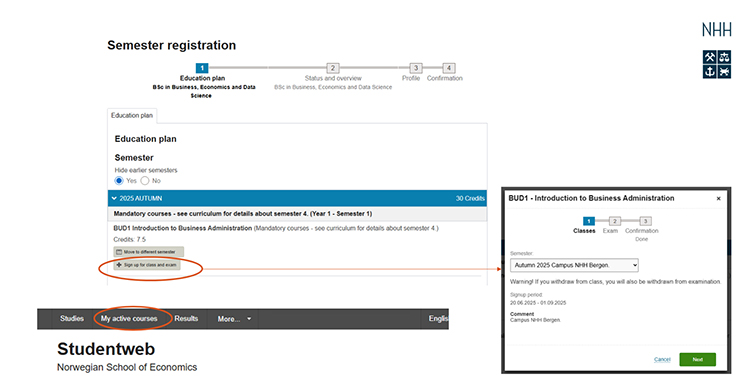
4. Status and overview: Check that you are registered for both classes and exams in all the courses you are taking.
5. Profile: Update your profile information, including your semester address and emergency contact person.
6. Semester fee: Make sure to pay the semester fee in Studentweb. You will find the invoice under “More...” and “Payments”.
7. Confirmation: When you see the confirmation page, your semester registration and payment is complete.

Withdrawing from exams
The deadline for withdrawing from exams is three weeks prior to the exam date.
-
Student key card
Student key card
The student key card is your access card and also functions for access to printers. You will need a valid ID in order to pick up the student key card in the Service centre.
Outside normal working hours, you will need to use the key card and your personal pin code to access NHH's buildings.
It is possible to change the pin code. Change pin code here.
-
Digital Student ID
Digital Student ID
The Student ID app functions as a semester receipt and student ID. You must pay the semester fee and complete the semester registration for the current semester on Studentweb before you can use the app. Note that it may take between three to five days before your payment is registered on Studentweb.
How to use the app
You choose NHH as your institution and then you log on via Feide with your regular NHH username and password. If you have paid the semester fee and registered, this information will show up in a yellow box at the bottom of the page. The information will be stored in the app itself, so you do not have to be online after the first registration.
Download the app
-
Pin code
Pin code
You can have your PIN-code sent to your e-mail by following the directions at the Studentweb website.